Key takeaways
- Capacity: 16GB(2 x 8GB)
- Tested Frequency Profile 1: PC5-48000 (6000MT/s)
- Tested Timings: 36-46-46-110
Best DDR5 RAM Under $100
The best DDR5 RAM under $100 for most new gaming PCs is a 32GB (2x16GB) DDR5-6000 kit with a low-profile heat spreader, while 64GB is the better upgrade if you regularly run creative software, virtual machines, or heavily modded games.
Quick Picks by Situation
| Situation | Best fit | Target specification | Typical market range |
|---|---|---|---|
| Lowest sensible gaming cost | Basic 32GB dual-channel kit | DDR5-5600, CL36–CL46 | $70–$85 |
| Best all-around value | 32GB performance kit | DDR5-6000, CL30–CL36 | $80–$100 |
| AMD Ryzen gaming build | EXPO-compatible 32GB kit | DDR5-6000, CL30 or CL32 | $85–$100 |
| Heavy multitasking and editing | 64GB value kit | DDR5-5600 or DDR5-6000, CL36–CL46 | $95–$120 |
| Large air cooler or compact case | Low-profile 32GB kit | About 32–35mm tall | $75–$100 |
Prices fluctuate by capacity, lighting, and promotions, so a 64GB kit may occasionally fall below $100, but 32GB remains the easier target at this budget. Avoid paying extra for RGB before confirming that the kit has the speed, timings, and profile your system needs.
Our top picks
 Patriot Viper Venom DDR5 RAM 16GB
- Capacity: 16GB(2 x 8GB)
- Tested Frequency Profile 1: PC5-48000 (6000MT/s)
- Tested Timings: 36-46-46-110
 G.SKILL Flare X5 Series DDR5 RAM
- * Requires overclocking/BIOS adjustments
- G.SKILL Flare X5 Series DDR5 U-DIMM Memory Kit,…
- Non-ECC, DDR5 U-DIMM, 288-pin, for Desktop PC &…
 CORSAIR Vengeance RGB DDR5 RAM 32GB
- Disclaimer: Maximum Speed requires overclocking/PC BIOS adjustments
- Dynamic Ten-Zone RGB Lighting: Illuminate your system with…
- Onboard Voltage Regulation: Enables easier, more finely-tuned, and…
| Product | Key specs | |
|---|---|---|
| Patriot Viper Venom DDR5 RAM 16GB | Capacity: 16GB(2 x 8GB) Tested Frequency Profile 1: PC5-48000 (6000MT/s) Tested Timings: 36-46-46-110 | Check price |
| G.SKILL Flare X5 Series DDR5 RAM | * Requires overclocking/BIOS adjustments G.SKILL Flare X5 Series DDR5 U-DIMM Memory Kit,… Non-ECC, DDR5 U-DIMM, 288-pin, for Desktop PC &… | Check price |
| CORSAIR Vengeance RGB DDR5 RAM 32GB | Disclaimer: Maximum Speed requires overclocking/PC BIOS adjustments Dynamic Ten-Zone RGB Lighting: Illuminate your system with… Onboard Voltage Regulation: Enables easier, more finely-tuned, and… | Check price |
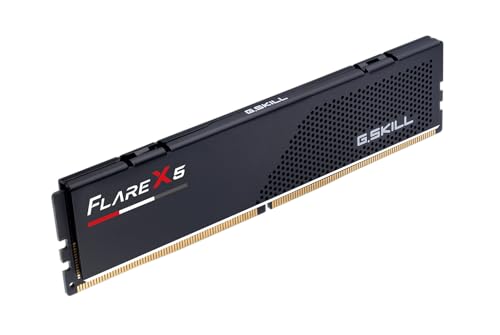 G.SKILL Flare X5 Series DDR5 RAM | * Requires overclocking/BIOS adjustments G.SKILL Flare X5 Series DDR5 U-DIMM Memory Kit,… Non-ECC, DDR5 U-DIMM, 288-pin, for Desktop PC &… | Check price |
As an Amazon Associate we earn from qualifying purchases at no extra cost to you.
Our Shortlist
Best Overall: 32GB DDR5-6000 CL30 or CL32
A 2x16GB DDR5-6000 kit with CL30 or CL32 timings offers the strongest balance for a current mainstream desktop. G.Skill Flare X5, G.Skill Ripjaws S5, Corsair Vengeance, Kingston Fury Beast, and comparable low-profile kits are commonly available in this general specification. The exact memory chips and secondary timings can vary between production batches, so compare the advertised kit specifications rather than relying only on the product family name.
For AMD Ryzen 7000 and 9000 desktop platforms, select a version explicitly marked for AMD EXPO when possible. Intel systems can use the same speed class, but an XMP-labeled kit may be the more natural choice. Many kits support both profiles, but dual-profile support should be confirmed on the package or manufacturer page.
Best Tight-Budget Choice: 32GB DDR5-5600
DDR5-5600 is the sensible fallback when DDR5-6000 kits exceed the budget. A 2x16GB kit at CL36 or CL40 normally provides much more practical value than a 16GB kit with a slightly higher advertised speed. The capacity advantage matters when a game, browser, voice chat, launcher, and recording software are open together.
Entry-level kits from Kingston Fury, Corsair Vengeance, Crucial Pro, and similar mainstream ranges can suit this role. Choose two modules rather than one 32GB module: two matched sticks enable dual-channel operation and generally provide better memory bandwidth.
Best Capacity Upgrade: 64GB DDR5-5600
If your work involves 4K video timelines, large photo catalogs, software development environments, content creation, or virtual machines, 64GB can be a better purchase than a faster 32GB kit. A 2x32GB DDR5-5600 kit under or near $100 is worth considering during a sale, even if its timings are looser.
Do not buy 64GB simply because the number is larger. For a typical gaming-only computer, moving from 32GB to 64GB often produces little frame-rate improvement. The extra capacity pays off when your workload actually exceeds roughly 24–28GB of active memory and begins relying on slower storage-based paging.
Best for Cooler Clearance: Low-Profile DDR5
Large RGB heat spreaders can interfere with the front fan of a dual-tower air cooler. Corsair Vengeance, Crucial Pro, G.Skill Flare X5, and G.Skill Ripjaws S5 versions are generally more space-conscious than tall RGB designs, though dimensions differ by model and generation.
Before ordering, measure the distance between the motherboard memory slots and the cooler’s front fan. A module around 32–35mm tall is usually easier to accommodate than one measuring 44–46mm. If the fan can be raised, check the case’s maximum CPU-cooler height as well; raising it by 10mm can eliminate the clearance problem but create a side-panel conflict.
DDR5 Kit Comparison
| Kit type | Capacity | Speed and timing example | Approx. module height | Best platform/use |
|---|---|---|---|---|
| Value dual-channel kit | 32GB (2x16GB) | DDR5-5600 CL36–CL46 | 32–35mm | Budget gaming and general use |
| Mainstream performance kit | 32GB (2x16GB) | DDR5-6000 CL30–CL36 | 32–36mm | Most Ryzen and Core desktops |
| Low-profile EXPO kit | 32GB (2x16GB) | DDR5-6000 CL30–CL32 | About 33mm | AMD Ryzen gaming systems |
| Capacity-first kit | 64GB (2x32GB) | DDR5-5600 CL36–CL46 | 34–44mm | Editing, development, virtual machines |
| Tall RGB kit | 32GB (2x16GB) | DDR5-6000 CL30–CL36 | 42–46mm | Showcase builds with generous clearance |
How Speed and Timings Affect the Choice
DDR5-6000 CL30 has a lower first-word latency than DDR5-6000 CL36. The approximate latency calculation is:
Latency in nanoseconds = 2000 × CAS latency ÷ memory speed
That gives approximately 10ns for DDR5-6000 CL30 and 12ns for DDR5-6000 CL36. The difference is measurable, but it is not usually worth sacrificing 32GB capacity, motherboard compatibility, or cooler clearance to obtain it. DDR5-5600 CL36 works out to about 12.9ns, which remains perfectly reasonable for a value system.
Timings are not the entire performance picture. Secondary timings, memory-controller behavior, BIOS maturity, and the application itself also matter. Treat DDR5-6000 CL30 as a useful target, not a requirement.
Platform Compatibility Before You Buy
- Check the motherboard’s memory support: confirm DDR5 rather than DDR4. The slots are physically different, and DDR4 and DDR5 cannot be mixed.
- Use a matched kit: buy two modules sold together instead of combining separate packages, even when their labels appear identical.
- Choose the correct profile: AMD EXPO is convenient for Ryzen systems; Intel XMP is common on Core platforms. Manual tuning is possible, but it should not be necessary for a normal purchase.
- Check the board’s memory list: a kit absent from the qualified vendor list may still work, but listed kits reduce uncertainty, particularly with 64GB modules.
- Confirm BIOS support: newer processors and high-capacity modules may benefit from a recent motherboard BIOS.
Installation and Ownership Advice
Install two modules in the motherboard slots recommended by its manual, commonly the second and fourth slots from the processor. After the first boot, enter the firmware setup and enable the EXPO or XMP profile. Without that step, memory often runs at a conservative default such as DDR5-4800, wasting much of the kit’s rated performance.
Run a memory stability test after enabling the profile. If the computer crashes, shows application errors, or fails to boot, reset the profile and try a lower memory speed or a newer BIOS. Do not assume that a booting desktop is fully stable; intermittent memory errors can appear only during long workloads.
DDR5 modules have no routine consumables. The parts most likely to cause trouble are the memory slots, the motherboard firmware, and the memory-controller settings—not the heat spreader itself. Keep dust from collecting around the CPU cooler, avoid forcing a module into the wrong orientation, and do not mix kits merely to reach a larger capacity. Four populated slots can be less tolerant of high speeds than two, so a single matched 2x32GB kit is preferable to adding another 2x16GB kit later.
Final Verdict
For the best DDR5 RAM under $100, buy 32GB (2x16GB) DDR5-6000 CL30 or CL32 with the appropriate EXPO or XMP profile and a heat spreader no taller than your cooler allows. Choose DDR5-5600 if it saves meaningful money, and choose 64GB when your applications regularly use more than 32GB. Capacity, matched modules, and physical clearance are more valuable than a small speed increase that your platform may not reliably support.