
The best 11 inch laptops for travel are the Lenovo Chromebook Duet 11 for light everyday work, Microsoft Surface Go 4 for Windows software, and the HP Chromebook x360 11 G4 EE for a rugged, inexpensive notebook that can tolerate frequent travel.
An 11-inch computer is easiest to live with when you treat it as a portability-first tool rather than a small replacement for a 15-inch laptop. The main compromises are a cramped keyboard, less screen area for side-by-side windows, and limited storage on many budget models. The payoff is a device that fits on an airline tray, weighs roughly 2–3 pounds, and can be carried all day without much thought.
Our top picks
 Dell Latitude 3190 11.6" HD 2-in-1 Touchscreen
- 1.1 GHz (boost up to 2.4GHz) Intel Celeron…
 Svikou 11" Pink 2-in-1 Convertible Touchscreen Laptop
- 【Portable 360° Touchscreen Design】
- Processor performance: 4-core, 4-thread processor with a maximum…
- Display quality: 1920x1200 IPS display with a 16:10…
 Svikou 11" Gray 2-in-1 Convertible Touchscreen Laptop
- 360° flip touchscreen: 11-inch touchscreen with a 360°…
- Processor performance: 4-core, 4-thread processor with a maximum…
- Display quality: 1920x1200 IPS display with a 16:10…
| Product | Key specs | |
|---|---|---|
| Dell Latitude 3190 11.6" HD 2-in-1 Touchscreen | 1.1 GHz (boost up to 2.4GHz) Intel Celeron… | Check price |
| Svikou 11" Pink 2-in-1 Convertible Touchscreen Laptop | 【Portable 360° Touchscreen Design】 Processor performance: 4-core, 4-thread processor with a maximum… Display quality: 1920x1200 IPS display with a 16:10… | Check price |
| Svikou 11" Gray 2-in-1 Convertible Touchscreen Laptop | 360° flip touchscreen: 11-inch touchscreen with a 360°… Processor performance: 4-core, 4-thread processor with a maximum… Display quality: 1920x1200 IPS display with a 16:10… | Check price |
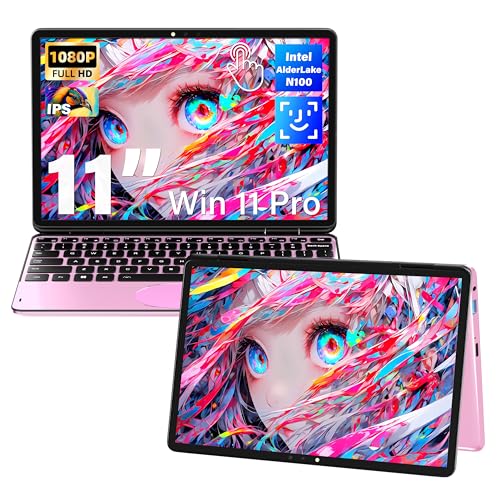 Svikou 11" Pink 2-in-1 Convertible Touchscreen Laptop | 【Portable 360° Touchscreen Design】 360° flip touchscreen: 11-inch touchscreen with a 360°… Processor performance: 4-core, 4-thread processor with a maximum… | Check price |
As an Amazon Associate we earn from qualifying purchases at no extra cost to you.
Best 11 Inch Laptops at a Glance
| Model | Screen | Weight | Typical battery claim | Best for |
|---|---|---|---|---|
| Lenovo Chromebook Duet 11 | 10.95-inch, 1920 × 1200 touchscreen | About 2.4 lb with keyboard and stand cover | Up to about 12 hours | Light work, travel, reading, video calls |
| Microsoft Surface Go 4 | 10.5-inch, 1920 × 1280 touchscreen | About 1.4 lb tablet-only; about 1.9 lb with keyboard | Up to about 12.5 hours | Windows apps and Microsoft 365 |
| HP Chromebook x360 11 G4 EE | 11.6-inch, 1366 × 768 touchscreen | About 3.0 lb | Up to about 12 hours | Rugged budget use and basic school or office work |
| Acer Chromebook 311 | 11.6-inch, 1366 × 768 display | About 2.6 lb | Up to about 15 hours | Lowest-cost travel computing |
| Lenovo 100e Chromebook Gen 4 | 11.6-inch, 1366 × 768 display | About 2.7 lb | Up to about 12 hours | Frequent handling and simple web work |
Battery figures are manufacturer estimates under controlled conditions. Web browsing, screen brightness, video calls, external displays, and poor Wi-Fi can reduce practical runtime substantially. Configuration and regional availability also vary, so check the exact model number before buying.
Our Picks by Travel Situation
Best overall: Lenovo Chromebook Duet 11
The Chromebook Duet 11 is the most balanced choice for travelers who mainly use browser-based applications, email, documents, streaming, and video calls. Its 10.95-inch 16:10 display gives more vertical room than the 1366 × 768 panels common on inexpensive 11.6-inch Chromebooks. That matters when reading long web pages or editing a document.
It is a detachable two-in-one, so the keyboard can be removed when you want a lighter tablet for an airport gate or hotel room. With the keyboard and cover attached, it is still compact enough for a small day bag. The trade-off is the keyboard: its layout is usable, but the keys and palm rest are noticeably smaller than on a conventional 13-inch laptop. A backlit keyboard is also not the norm at this price and size.
Choose it if portability, screen quality, and low weight matter more than desktop-class multitasking. Avoid it if you regularly use specialized Windows software, maintain large local files, or need a full-size keyboard for hours of typing.
Best for Windows work: Microsoft Surface Go 4
The Surface Go 4 is the most capable option when your workflow requires Windows. Its 10.5-inch 3:2 screen is particularly comfortable for documents because it is taller than a typical widescreen laptop panel. The display is sharp, the tablet is exceptionally light, and the optional Type Cover makes it a practical notebook for short writing sessions.
Its important limitation is that the keyboard is an accessory, not part of the tablet’s base price. Include the keyboard when comparing total costs and weight. The compact keyboard works well for notes, email, and moderate document editing, but it is not ideal for a full workday of touch typing. The Intel Processor N-series platform is suited to office applications and browser tabs, not demanding video editing or serious 3D work.
Pick the Surface Go 4 if Windows compatibility is non-negotiable or if you already use Microsoft accessories and services. It is also the easiest model here to use as both a tablet and a laptop, although the complete setup can cost more than a basic Chromebook.
Best rugged budget choice: HP Chromebook x360 11 G4 EE
HP’s education-focused Chromebook x360 11 G4 EE is designed around frequent handling. Its reinforced construction, spill-resistant keyboard, and compact convertible design are more useful for commuting, children, classrooms, and shared workspaces than for achieving the lowest possible weight.
The 11.6-inch screen is comfortable enough for short sessions but less spacious than the Duet’s higher-resolution display. At 1366 × 768, text and web pages offer less room, and two-window multitasking becomes awkward. The keyboard generally feels more like a traditional laptop than a detachable tablet keyboard, which can make it the better choice for repeated typing.
Buy it when durability and a built-in keyboard are more important than premium screen quality. Confirm the processor, memory, and storage configuration because education Chromebook families are sold in several versions.
Best for the lowest-cost basic work: Acer Chromebook 311
The Acer Chromebook 311 is a sensible choice for web browsing, online forms, school portals, cloud documents, and travel entertainment. Its major advantage is value: budget configurations are commonly available at a lower general market price than Windows ultraportables or detachable two-in-ones.
The 11.6-inch chassis is light and easy to pack, while battery claims can reach roughly 15 hours depending on the configuration. The compromises are predictable: modest processors, limited local storage, a low-resolution display on many versions, and a keyboard that is functional rather than luxurious. It is best as a focused machine, not as a miniature workstation.
Best for heavy handling: Lenovo 100e Chromebook Gen 4
The Lenovo 100e Chromebook Gen 4 is another education-oriented 11.6-inch Chromebook with a reinforced design and a full built-in keyboard. It makes sense for commuters who want a simple notebook that can be placed in a backpack repeatedly without the delicacy of a tablet accessory system.
Its screen and performance are aimed at everyday ChromeOS tasks. It is not the pick for high-resolution media work, but it can handle documents, browser-based business tools, video calls, and offline files when configured with enough storage. Look for 8GB of memory if you routinely keep many browser tabs open.
Screen Comfort and Keyboard Size: The Real Trade-off
Small screens are not equally comfortable. A 10.5- or 10.95-inch display with a 3:2 or 16:10 aspect ratio usually provides more usable document space than an older 11.6-inch 1366 × 768 panel. Resolution is only part of the story: viewing distance, font size, brightness, glare, and whether you are reading dense spreadsheets all matter.
- For reading and documents: favor the Surface Go 4 or Chromebook Duet 11 because their taller, sharper screens reduce scrolling.
- For long typing sessions: favor the HP, Acer, or Lenovo 100e because a fixed laptop deck is usually steadier than a thin detachable cover.
- For cramped travel tables: a detachable model is easier to reposition, and its screen can be raised separately from the keyboard.
- For spreadsheets: an 11-inch device is workable for viewing and light edits, but an external monitor or larger laptop is preferable for sustained work.
Decision Matrix
| Your situation | Best fit | Why | Main compromise |
|---|---|---|---|
| Lowest practical budget | Acer Chromebook 311 | Simple hardware and low general market pricing | Basic screen and limited multitasking |
| Frequent typing | HP Chromebook x360 11 G4 EE | Built-in keyboard and sturdier laptop format | Heavier and lower-resolution screen |
| Windows-only application | Microsoft Surface Go 4 | Runs Windows desktop software | Keyboard costs extra and remains compact |
| Lightest flexible setup | Lenovo Chromebook Duet 11 | Detachable keyboard and tablet mode | Less comfortable for all-day typing |
| Rough daily handling | Lenovo 100e Chromebook Gen 4 | Education-oriented reinforced construction | Entry-level display and performance |
Battery Life and Travel Math
Do not plan around the advertised maximum. If a Chromebook is rated for 12 hours, a safer travel estimate is around 8 hours after allowing for brightness, video calls, background syncing, and imperfect Wi-Fi. A model rated for 15 hours might deliver roughly 9–11 hours in mixed use.
For example, a six-hour travel day with three hours of documents, one hour of video calls, and two hours of streaming can consume more than six hours of nominal battery time because video calls and streaming use more power than idle reading. If you need a reliable full day away from outlets, select the larger battery option within the model family, reduce screen brightness, download entertainment in advance, and carry a compact USB-C charger. Check that the charger supports the laptop’s required wattage rather than assuming any phone charger will work.
Ownership Realities
The first things likely to wear are the keyboard surface, hinge or detachable cover, charging port, and battery. Detachable keyboards are convenient but can collect dust around their pogo-pin contacts; wipe the contacts with a dry, lint-free cloth and avoid forcing a connection at an angle. Keep drinks away from any keyboard, including spill-resistant models—spill resistance is not waterproofing.
Budget Chromebooks often include 32GB or 64GB of storage. ChromeOS updates, downloaded media, and offline files can consume that quickly. Use cloud storage or a supported microSD card where appropriate, and leave several gigabytes free for updates. On Windows, 64GB is particularly restrictive, so a Surface Go 4 with more storage is preferable if you keep large applications or offline files.
For the longest service life, choose at least 8GB of memory when available, check the device’s remaining ChromeOS update-support period, and buy a padded sleeve that protects the screen from pressure inside a full bag. A compact laptop is only genuinely portable if its charger, keyboard cover, and protection are included in the packing weight.
Final Recommendation
Choose the Lenovo Chromebook Duet 11 for the best overall mix of screen comfort, flexibility, battery life, and travel weight. Choose the Microsoft Surface Go 4 when Windows software decides the purchase. For frequent typing and rougher handling, the HP Chromebook x360 11 G4 EE or Lenovo 100e Chromebook Gen 4 is more practical than a detachable tablet. The Acer Chromebook 311 remains the value pick for basic browser-based work, provided you accept its smaller workspace and entry-level hardware.





