
The best gaming keyboards for speed and control in 2026 are Hall-effect models with adjustable actuation, rapid-trigger input, and at least 1,000Hz polling; choose the Wooting 80HE for the strongest all-round competitive feature set, the Razer Huntsman V3 Pro TKL for tournament-focused control, or a conventional mechanical wireless board if flexibility matters more than analog-style input.
Our top picks
 AULA F75 Pro Wireless Mechanical Keyboard
- Tri-mode Connection Keyboard: AULA F75 Pro wireless mechanical…
- Hot-swap Custom Keyboard: This custom mechanical keyboard with…
- Advanced Structure and PCB Single Key Slotting: This…
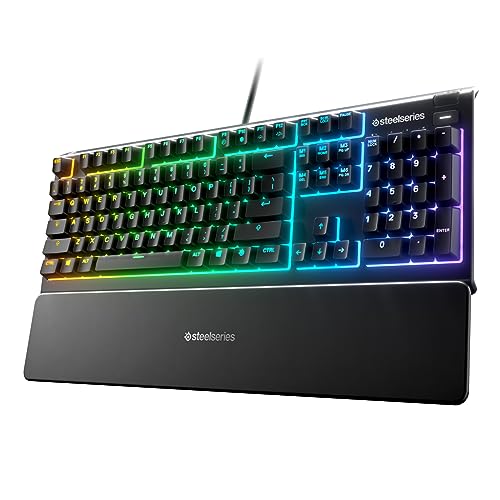 SteelSeries Apex 3 Gaming Keyboard
- Ip32 water resistant
- 10-zone RGB illumination
- Whisper quiet gaming switches
 Logitech G413 SE Full-Size Mechanical Gaming Keyboard
- Take your gaming skills to the next level:…
- PBT keycaps: Heat- and wear-resistant, this computer gaming…
- Tactile mechanical switches: Uncompromising performance is always within…
| Product | Key specs | |
|---|---|---|
| AULA F75 Pro Wireless Mechanical Keyboard | Tri-mode Connection Keyboard: AULA F75 Pro wireless mechanical… Hot-swap Custom Keyboard: This custom mechanical keyboard with… Advanced Structure and PCB Single Key Slotting: This… | Check price |
| SteelSeries Apex 3 Gaming Keyboard | Ip32 water resistant 10-zone RGB illumination Whisper quiet gaming switches | Check price |
| Logitech G413 SE Full-Size Mechanical Gaming Keyboard | Take your gaming skills to the next level:… PBT keycaps: Heat- and wear-resistant, this computer gaming… Tactile mechanical switches: Uncompromising performance is always within… | Check price |
 Razer BlackWidow V4 X Mechanical Gaming Keyboard | With zero distance between actuation and reset points… Expand the arsenal of commands with a set… FUNCTION ROLLER and SECONDARY MEDIA KEYS: Pause, play,… | Check price |
As an Amazon Associate we earn from qualifying purchases at no extra cost to you.
Quick picks by gaming situation
| Situation | Best fit | Why it makes sense |
|---|---|---|
| Competitive FPS and frequent strafing | Wooting 80HE | Adjustable Hall-effect actuation, rapid trigger, 8,000Hz polling, and SOCD-style competitive input options |
| FPS player who wants a dedicated control dial | Razer Huntsman V3 Pro TKL | Analog optical switches, rapid trigger, adjustable actuation, and onboard controls for quick changes |
| Mixed gaming and office work | SteelSeries Apex Pro TKL Wireless Gen 3 | Adjustable OmniPoint switches, wireless operation, OLED controls, and a compact tenkeyless layout |
| Custom keyboard enthusiast | Keychron Q1 HE | 75% layout, Hall-effect switches, hot-swappable design, and QMK/VIA-style remapping support |
| Lowest sensible cost | Wired mechanical keyboard with hot-swappable linear switches | Often available around $60–$120 and delivers consistent input without paying for features you may not use |
What actually makes a gaming keyboard fast?
Speed is not one specification. It is the combination of switch travel, actuation point, release behavior, scan rate, USB or wireless connection, and the game’s own input handling.
Switch type: mechanical, optical, or Hall effect?
- Mechanical switches: These use physical metal contacts. Linear red-style switches are popular for gaming because they have a smooth keypress, while tactile and clicky switches provide more feedback but can feel slower or louder. Actuation is commonly around 1.2–2.0mm, depending on the switch.
- Optical switches: These register a change in light rather than relying on a conventional electrical contact. Razer’s analog optical switches can offer adjustable actuation and rapid-trigger behavior.
- Hall-effect switches: These use magnets and sensors to detect key position. They can support adjustable actuation, rapid trigger, analog-style input, and features such as dual-action keys. Wooting, Razer, SteelSeries, and Keychron all offer Hall-effect or comparable adjustable-input models.
For ordinary gaming, a good mechanical keyboard is already fast enough. Hall-effect technology is most valuable in games with repeated movement corrections, such as competitive first-person shooters. It does not automatically improve aim, and an 8,000Hz board cannot compensate for high frame-time latency, poor network performance, or inconsistent technique.
Actuation and rapid trigger
Adjustable actuation lets you decide how far a key must travel before it registers. A shallow setting can make movement keys respond quickly, but it also increases accidental presses during typing. A deeper setting is more forgiving.
Rapid trigger changes the reset behavior. Instead of waiting for a fixed reset point, the key can register again as soon as it moves upward by a small distance. This is useful for rapid counter-strafing, repeated taps, and quick direction changes. Start with a moderate setting—roughly 0.2–0.5mm of release sensitivity—then increase the distance if you trigger unwanted inputs.
Head-to-head: leading competitive keyboards
| Keyboard | Layout | Switch/input technology | Polling or connection | Notable controls |
|---|---|---|---|---|
| Wooting 80HE | 80% / tenkeyless-style | Hall effect; adjustable actuation and rapid trigger | Up to 8,000Hz wired | Web-based configuration, extensive remapping, analog input, competitive input modes |
| Razer Huntsman V3 Pro TKL | Tenkeyless | Analog optical switches; adjustable actuation and rapid trigger | Up to 8,000Hz wired | Onboard adjustment controls, rapid-trigger dial, profile controls, media functions |
| SteelSeries Apex Pro TKL Wireless Gen 3 | Tenkeyless | Adjustable OmniPoint Hall-effect switches | 2.4GHz wireless, Bluetooth, and wired modes | OLED display, control knob, wireless flexibility, per-key adjustment |
| Keychron Q1 HE | 75% | Hall effect; adjustable actuation and rapid trigger | Wired and wireless modes, depending on configuration | Aluminum case, rotary knob, customizable layout, enthusiast-oriented construction |
The Wooting 80HE is the safest choice when competitive features take priority. Its software is particularly important: the keyboard exposes detailed actuation and input settings without forcing you to rely on a basic desktop utility. The 80% layout preserves arrow keys and a navigation cluster while removing the number pad.
The Huntsman V3 Pro TKL is a strong alternative if you prefer physical controls on the keyboard itself. Its dial and dedicated buttons make it convenient to adjust actuation or switch profiles between games. Optical switches feel different from Hall-effect switches, so buyers who want a conventional mechanical feel should try before committing.
The Apex Pro TKL Wireless Gen 3 is the better fit for someone who moves between a gaming PC, laptop, or console-like setup. Wireless latency is low enough for most competitive play when using its 2.4GHz receiver, but wired USB remains the most predictable option for tournaments and troubleshooting. Bluetooth is convenient, not the connection to choose for serious latency-sensitive matches.
The Keychron Q1 HE emphasizes build and customization. Its 75% layout adds a function row and navigation keys in less space than a tenkeyless board. It is attractive for users who want one keyboard for gaming, programming, and daily typing, though its enthusiast-oriented software and layout can require more setup than a mainstream gaming model.
Polling rate: useful upgrade or specification race?
Polling rate is how often the keyboard reports its state to the computer. At 1,000Hz, the theoretical interval is 1 millisecond; at 8,000Hz, it is 0.125 milliseconds. The maximum theoretical difference is therefore less than 1ms, and the practical improvement depends on the computer, game engine, USB behavior, and frame rate.
Choose 8,000Hz if you play high-refresh competitive games and want every available latency advantage. For general gaming, 1,000Hz or 2,000Hz is already responsive. Higher polling can increase USB and CPU activity, although modern gaming systems generally handle it without difficulty. If a high polling setting causes stutter or compatibility problems, reduce it; a stable 1,000Hz connection is better than an unreliable 8,000Hz one.
Remapping, media controls, and everyday usability
Competitive keyboards are often optimized around WASD, but daily use exposes their compromises. Check whether the keyboard supports:
- Per-key remapping: Useful for assigning crouch, push-to-talk, macros, or application shortcuts without changing every game’s controls.
- Multiple profiles: A good board should store separate settings for games and typing. Onboard profile storage is especially useful on shared computers.
- Media controls: A volume roller and play/pause button are faster than using an overlay. Dedicated controls are preferable to a function-layer shortcut if you regularly adjust audio.
- Adjustable actuation per key: Keep movement keys sensitive while using a deeper setting for space, enter, or typing keys.
- SOCD or dual-action functions: These can be useful in supported competitive games, but rules vary. Check tournament policies before using simultaneous opposite-direction features.
Be cautious with macro systems. A remapped key or harmless application shortcut is not the same as an automated sequence. Competitive games and tournaments may prohibit macros, rapid-fire functions, or certain forms of simultaneous input.
Wireless latency and battery trade-offs
For gaming, prioritize a dedicated 2.4GHz wireless receiver over Bluetooth. A quality 2.4GHz connection normally offers low, consistent latency, while Bluetooth is best for convenience and battery conservation. Wired mode removes battery concerns and can support the highest polling rates on many keyboards.
Battery life depends on lighting, polling rate, display use, and whether the keyboard is using 2.4GHz or Bluetooth. A practical wireless model may last roughly 30–150 hours between charges, but advertised figures often assume low lighting and reduced polling. If you play four hours per day, a 60-hour battery lasts about 15 days:
60 hours ÷ 4 hours per day = 15 days.
That calculation is more useful than a headline battery number because RGB brightness and high-performance wireless modes can cut runtime substantially.
Ownership realities: what wears first?
Keycaps usually show shine first, especially ABS caps under frequently used keys. Stabilizers on the space bar and shift keys may develop rattle, while dust and hair can make switches feel inconsistent. Mechanical contact switches can eventually chatter, but hot-swappable designs make replacement easier. Hall-effect boards avoid traditional electrical contact wear, although keycaps, stabilizers, springs, and the USB cable still remain consumable parts.
Clean the board with the cable disconnected. Remove loose debris with a soft brush or air blower, wipe keycaps with a lightly damp microfiber cloth, and avoid spraying liquid directly into switches. Do not use aggressive solvents on printed legends or unverified lubricants inside optical and Hall-effect mechanisms. If a key starts repeating, first test another USB port, update firmware, inspect for debris, and reset unusual actuation or remapping settings before assuming the hardware has failed.
How to configure a new competitive keyboard
- Update firmware and software: This can resolve connection problems and add profile or input features.
- Create separate profiles: Make one for FPS games, one for slower games, and one for typing.
- Set movement keys moderately: Begin around 1.0mm actuation and 0.3–0.5mm rapid-trigger sensitivity, then adjust gradually.
- Test for accidental inputs: Type a paragraph and play in a low-stakes training area. If keys fire while resting your fingers, increase actuation depth or release distance.
- Set polling conservatively: Use 8,000Hz only if your system remains stable and the game benefits from it.
- Check competition rules: Disable questionable simultaneous-input or macro features before ranked or tournament play.
For most buyers, the decision is simple: choose a Hall-effect keyboard if adjustable actuation and rapid trigger directly support the games you play; choose a conventional mechanical board if you value switch feel, lower cost, and broad compatibility; choose wireless only when a clear desk and multi-device use justify the battery and connection trade-offs.





