
Our Top Picks
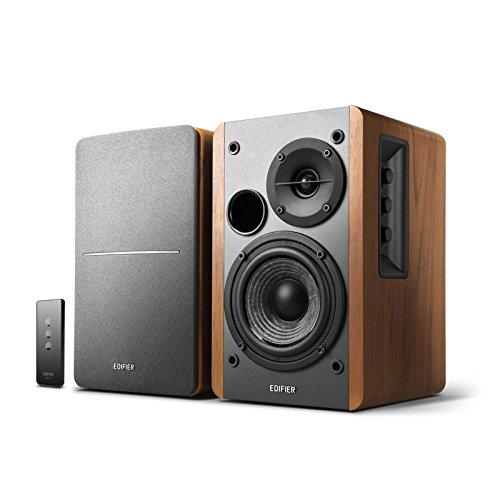 Edifier R1280T Powered Bookshelf Speakers -2.0 Near Field6.9 x 9.5 x 5.8 inches10.8 poundsCheck on Amazon


The best studio monitor speakers for home studios are the PreSonus Eris E5, a 5.25-inch two-way active pair that delivers honest midrange and usable low-end in a small untreated or lightly treated room, with balanced XLR and TRS inputs plus onboard acoustic tuning. They suit producers working at a desk in rooms of roughly 10–20 m² who mix at moderate volume and want a monitor they can grow with. If your desk is shallow, your walls are thin, or your budget is tight, the 3.5-inch PreSonus Eris 3.5 is the safer pick — a smaller woofer excites fewer room modes and needs less space behind it. If you want the most neutral, longest-lived platform and can treat your room, the Yamaha HS4 is the premium choice, and its ROOM CONTROL and HIGH TRIM switches let you compensate for a desk against a wall. The twelve monitors below are grouped by how much low-end they can honestly produce and how many connection options they give you.
Top 3 Picks
Best overall: PreSonus Eris E5. A 5.25-inch active two-way with XLR, TRS and RCA inputs and four separate acoustic tuning controls, which is the combination that makes a small room workable without software correction. It is the monitor most home producers can keep through two or three room moves.
Best budget: PreSonus Eris 3.5. The cheapest route to a genuinely neutral nearfield with balanced TRS inputs, a front-panel headphone jack and a 3.5 mm aux input for quick reference listening. It will not produce sub-bass, but it will not lie to you about the midrange either.
Best premium: Yamaha HS4. The 4.5-inch member of Yamaha’s HS line, voiced with the same flat, slightly forward character the series is known for. Best for producers who have at least basic acoustic treatment and want a reference that translates to other rooms.
Quick Comparison
| Product | Best for | Key specs | Connections | Price tier |
|---|---|---|---|---|
| Ortizan C7 | Wireless-first desktops | Powered pair, compact nearfield class, Bluetooth 5.3 | Bluetooth 5.3 plus wired analogue input | Budget |
| PreSonus Eris 3.5 | First serious nearfield pair | 3.5 in woofer, 1 in silk dome, 25 W per side, 80 Hz–20 kHz | Balanced 1/4 in TRS, RCA, front 3.5 mm aux and headphone out | Budget |
| Edifier R1280T | Wired desktop listening and light editing | 4 in woofer, 13 mm tweeter, 42 W total RMS, 55 Hz–20 kHz | Two sets of RCA line inputs | Mid-range |
| Edifier MR3 | Hi-Res listening plus casual mixing | 3.5 in woofer, 1 in silk dome, Hi-Res Audio certified | Balanced TRS, RCA, Bluetooth | Mid-range |
| Yamaha HS4 | Translation-critical mixing | 4.5 in cone woofer, 1 in dome, bi-amped, 60 Hz–22 kHz class | Balanced XLR/TRS combo, RCA, ROOM CONTROL and HIGH TRIM | Premium |
| Mackie CR3.5 | Podcasting and video editing desks | 3.5 in woofer, silk dome tweeter, front tone knob | 1/4 in TRS, RCA, 3.5 mm aux, front headphone out | Budget |
| ULTIMEA BS-3 | Three-way detail at a desk | 3-way powered bookshelf, three drivers per cabinet | Wired line inputs plus wireless streaming | Premium |
| PreSonus Eris E5 | Small treated rooms, long-term ownership | 5.25 in woofer, 1 in silk dome, 80 W Class AB, 53 Hz–22 kHz | XLR, TRS, RCA, Acoustic Space and Low Cut controls | Mid-range |
| Sony SS-CS5M2 | Passive setups with an existing amp | 3-way, 3 drivers, ~5 in class woofer, 6 ohm nominal | Passive binding posts — amplifier required | Premium |
| M-AUDIO BX3 | Loud desktop monitoring on a budget | 3.5 in woofer, 1 in silk dome, high peak-power rating for its size | XLR, TRS, RCA, front 3.5 mm aux and headphone out | Budget |
| Edifier R980T | Cheapest wired stereo pair | 4 in woofer, 13 mm tweeter, 24 W total RMS, 70 Hz–20 kHz | Two RCA line inputs | Budget |
| Pioneer DJ DM-40D | DJ booths and hybrid production desks | 4 in woofer, 3/4 in soft dome, bi-amped, 70 Hz–30 kHz class, DSP with two EQ modes | RCA, 3.5 mm stereo mini, front headphone out | Premium |
How We Chose
This roundup is built from published manufacturer specifications, brand documentation, and the physics of how small rooms behave — not from lab measurement. The selection criteria were:
- Driver size versus realistic room size. A 3.5-inch woofer and a 5.25-inch woofer solve different problems. Small drivers keep you out of room-mode trouble in a bedroom; larger drivers give you low-mid information you can actually act on.
- Connection flexibility. Balanced TRS or XLR inputs matter if you own an audio interface. RCA-only is fine for a laptop or a consumer DAC. Bluetooth is a convenience feature and a latency trade-off, not an accuracy feature.
- Onboard tuning. Shelving and low-cut controls let you compensate for a desk against a wall or a corner. Monitors without them force you to fix problems in software.
- Category fit. Powered monitors, passive bookshelf speakers and Bluetooth-capable desk speakers are not interchangeable. We grouped them so you can see which is which.
- Upgrade path and ownership. A pair that accepts a subwoofer, survives a move, and still has parts available in three years is worth more than a slightly better-sounding pair that does not.
1. Ortizan C7 – Best for wireless-first desktops
As an Amazon Associate we earn from qualifying purchases at no extra cost to you.

The Ortizan C7 is for the producer who wants a pair of powered desktop monitors that can also stream from a phone or a laptop without an audio interface in the chain. If your workflow involves a lot of listening, referencing and sketching rather than critical mixing, the built-in Bluetooth 5.3 is the whole point.
Key specs at a glance:
- Powered stereo pair in a compact nearfield cabinet class
- Bluetooth 5.3 wireless input for phone, tablet or laptop streaming
- Wired analogue input for a computer, interface or media player
- Black finish, desktop footprint sized for a normal desk rather than a console
- Integrated amplification — no separate amp required
The appeal here is convenience density. One pair, one power lead, and you can be playing audio from a phone in under a minute with no interface, no cable run across the desk and no driver installation. For a home studio that doubles as a general-purpose listening setup — which is most home studios — that matters more than a spec sheet suggests, because the monitor you actually turn on is the monitor you actually learn.
The trade-offs are the usual ones for this class. Bluetooth audio involves encoding and buffering, so the latency between a key press or a drum pad hit and the sound you hear is typically well into the range where it becomes distracting for recording. Treat wireless as a playback and reference path, not a tracking path. Wired monitoring through the analogue input is the mode to use when timing matters.
Second, budget-tier active cabinets usually skip the balanced input stage and the acoustic tuning controls found further up the market. That is not a defect at this price, but it means you cannot dial in a low cut or a high shelf to suit a desk against a wall — you solve those problems with placement and, if needed, software EQ on your master bus.
Pros
- Bluetooth 5.3 built in, so streaming needs no interface or DAC
- Simple one-pair, one-cable setup that suits shared desks
- Compact cabinets fit shallow desks and shelves
- Budget-tier cost makes it an easy second pair or a first pair
Cons
- Wireless monitoring introduces latency unsuitable for tracking
- No balanced inputs or onboard tuning controls in this class
- Small cabinets cannot produce meaningful sub-bass information
- Limited headroom compared with mid-range active monitors
Nearest alternative in this list: the M-AUDIO BX3. Both are compact budget active pairs, but they pull in opposite directions. The BX3 is wired-only and gives you XLR, TRS and RCA inputs plus a front headphone jack — better for an interface-based workflow. The Ortizan C7 gives you Bluetooth and a simpler setup. Choose the Ortizan if wireless playback is a daily need; choose the BX3 if you already own an interface and want the wider input set.
2. PreSonus Eris 3.5 – Best for a first serious nearfield pair

The PreSonus Eris 3.5 is the monitor to buy when you want your first pair that behaves like a studio tool rather than a computer speaker. It suits bedroom producers, students and anyone mixing at low to moderate volume on a desk in a small, untreated room.
Key specs at a glance:
- 3.5-inch woven composite low-frequency driver
- 1-inch silk-dome high-frequency driver
- Roughly 25 W per side, 50 W total system power, Class AB amplification
- Published response around 80 Hz to 20 kHz
- Balanced 1/4-inch TRS and unbalanced RCA rear inputs
- Front-panel 3.5 mm stereo aux input, headphone output and volume control
- High-frequency trim for basic tonal adjustment
The reason this pair keeps appearing on shortlists is the input complement. At the budget tier, most competitors give you RCA and stop. The Eris 3.5 gives you balanced TRS, which means a proper interface connection without an adapter, plus a front-panel aux and headphone jack so you can switch between your interface and your phone without crawling behind the desk. That front panel is the difference between a monitor you use daily and one you leave switched off.
Sonically, the honest description is “midrange-forward with a rolled-off bottom”. A 3.5-inch woofer in a small sealed or lightly ported box simply cannot move enough air to reproduce a 40 Hz sine wave at a useful level. What it can do is show you whether your kick and bass are fighting each other in the 100–250 Hz region, which is where most home mixes actually go wrong. Use it as a microscope for the low-mid range and check sub content on headphones or in a car.
Placement matters more than with larger monitors. Keep them roughly an arm’s length away, tweeters at ear height, and form an equilateral triangle with your head. Because the cabinet is small, you can put them close to a wall without the low-end bloom a 5-inch monitor would produce — but do not put them in a corner.
Pros
- Balanced TRS inputs at a budget-tier price point
- Front-panel aux, headphone out and volume for daily convenience
- Small cabinets behave well in untreated rooms and on shallow desks
- Widely owned, so advice and setup guides are easy to find
Cons
- No usable output below roughly 80 Hz
- Limited headroom — easy to drive into compression on loud material
- Tuning controls are minimal compared with the Eris E5
- Not a monitor you will keep once you move to a larger room
Nearest alternative in this list: the M-AUDIO BX3. The BX3 advertises considerably more peak power for the same driver size and adds XLR plus a front aux and headphone out, so it can play louder. The Eris 3.5 tends to be the more conservative, flatter-sounding option. If you mix quietly and want accuracy, take the Eris 3.5; if you need level for bandmates in the room, the BX3 has more in reserve.
3. Edifier R1280T – Best for wired desktop listening and light editing

The Edifier R1280T is for the producer who wants a pair of active bookshelf speakers that sound good for hours of listening, handle light editing work, and never need a driver or an app. It suits podcasters, video editors and musicians who treat the desk as a listening space first.
Key specs at a glance:
- 4-inch mid-woofer with a 13 mm silk-dome tweeter
- Roughly 42 W total RMS, split across the two cabinets
- Published response around 55 Hz to 20 kHz
- Two sets of RCA line inputs, switchable — useful for two sources
- Volume, bass and treble controls on the side of the active cabinet
- MDF cabinet with a wood-effect finish; no Bluetooth on this model
The 4-inch driver is the sweet spot of this list for a desk. It moves enough air to make low-mid information audible — you can hear a bass guitar’s body rather than just its upper harmonics — while still being small enough that a wall two feet behind it does not turn your room into a boom chamber. The published 55 Hz figure is a −10 dB style boundary rather than a usable flat response, so treat everything below about 60 Hz as “present but not trustworthy”.
The two switchable RCA input pairs are a genuinely useful feature that gets overlooked. You can leave a computer connected to one and a phone or a second machine on the other without swapping cables. Side-mounted tone controls are convenient but coarse — they are voicing controls, not room correction, so resist the urge to leave the bass knob turned up as a permanent “improvement”.
The absence of Bluetooth is a deliberate feature here rather than a shortfall: it keeps the price in the mid-range tier and removes a latency path you should not be using for critical work anyway. If you want wireless playback in this family, that is what the MR3 and the R980T’s sibling models are for.
Pros
- 4-inch driver gives usable low-mid information at a desk
- Two switchable RCA inputs suit a two-source desk
- Long-session listening character is easy on the ears
- Simple, appliance-like operation with no software involved
Cons
- No balanced inputs and no Bluetooth
- Tone controls are coarse and easy to misuse
- Not voiced as a flat reference monitor — pleasant, not surgical
- RCA-only connection limits cable runs beyond a few metres
Nearest alternative in this list: the Edifier R980T. They share a family resemblance and a control layout, but the R1280T has the larger driver, more power and a lower published frequency floor, while the R980T is the cheaper, smaller, more limited version. If the difference in price is comfortable, the R1280T is the better long-term desk speaker; if you are spending as little as possible, the R980T gets you most of the way.
4. Edifier MR3 – Best for Hi-Res listening plus casual mixing

The Edifier MR3 is aimed at the producer who wants a certified high-resolution playback path and a balanced input for an interface, but who is not mixing for clients. It fits a hybrid desk where music listening and light production share the same speakers.
Key specs at a glance:
- 3.5-inch low-frequency driver with a 1-inch silk-dome tweeter
- Hi-Res Audio certification, with high-resolution decoding handled by the internal electronics
- Class-D amplification with per-channel power in the same range as other 3.5-inch active monitors
- Balanced TRS input for an interface, plus RCA for consumer sources
- Bluetooth wireless input for phone and tablet playback
- Compact desktop cabinet footprint in a black finish
The Hi-Res certification is the headline, and it is worth understanding what it does and does not mean. It confirms the electronics accept and process high-sample-rate digital audio without downsampling it to a lower tier first. It does not mean the acoustic output is flat, and it does not mean a 3.5-inch woofer can reproduce content below its physical limit. Think of it as a guarantee about the digital path, not about the room.
Where the MR3 earns its place is flexibility. Balanced TRS covers your interface, RCA covers a games console or a TV, and Bluetooth covers everything else. That is a broader input set than the PreSonus Eris 3.5 offers at the same driver size, and it makes the MR3 a better fit for a desk that serves multiple jobs.
For mixing, treat it the way you would any 3.5-inch monitor: excellent for checking vocal intelligibility, stereo placement and the low-mid balance, unreliable for judging sub-bass. Its slightly more consumer-friendly voicing compared with a dedicated reference monitor is a benefit for long listening sessions and a mild handicap when you are trying to hear problems.
Pros
- Balanced TRS plus RCA plus Bluetooth covers nearly every source
- Hi-Res Audio certification for high-resolution playback chains
- Compact enough for a small desk or a shelf
- Comfortable for long listening sessions as well as editing
Cons
- 3.5-inch driver limits genuine low-frequency accuracy
- Voicing leans pleasant rather than clinical
- Fewer acoustic tuning controls than a dedicated studio monitor
- Bluetooth remains a latency trade-off for recording work
Nearest alternative in this list: the PreSonus Eris 3.5. Both are 3.5-inch active pairs with balanced inputs, and they are close in driver size. The Eris 3.5 gives you a front-panel aux and headphone jack and a more neutral studio voicing; the MR3 gives you Hi-Res certification, Bluetooth and a slightly wider source set. Choose the MR3 if your desk is a listening station first; choose the Eris 3.5 if it is a mixing station first.
5. Yamaha HS4 – Best for translation-critical mixing

The Yamaha HS4 is for the producer who has moved past “I can hear my music” and into “I need my mixes to work in other rooms”. It suits a treated or semi-treated small studio and a user who is willing to spend time on placement.
Key specs at a glance:
- 4.5-inch cone low-frequency driver with a 1-inch dome tweeter
- Bi-amplified design with separate low- and high-frequency amplification
- Published response in the roughly 60 Hz to 22 kHz class
- Balanced XLR/TRS combo input plus an additional line input
- ROOM CONTROL and HIGH TRIM switches for boundary and brightness compensation
- Rear-panel level control; black finish; sold as a matched pair
The HS series has a specific reputation: flat, unflattering, and slightly forward in the upper midrange. That is a feature. A monitor that flatters your mix is a monitor that lets you ship a mix with a harsh 3 kHz problem you never heard. The HS4 carries that voicing into a 4.5-inch cabinet that works on a desk without the room-filling low end of the larger models in the line.
The two switches on the back are what separate this from budget competitors. ROOM CONTROL attenuates the low end in fixed steps, which is exactly what you need when the monitors sit close to a wall or on a desk that is acting as a reflective surface. HIGH TRIM does the same for the top end, useful in a room with a lot of bare drywall or glass. These are blunt instruments compared with a full DSP room-correction suite, but they cost nothing and they solve the two most common small-room problems.
The honest caveat: this monitor rewards a treated room and punishes a bad one. In a completely bare bedroom with hard walls, the flat response will reveal every reflection, and the result can be fatiguing. Budget for at least basic treatment — a rug, soft furnishings, and absorption at the first reflection points — before you blame the speakers.
Pros
- Flat, translation-focused voicing that exposes problems early
- ROOM CONTROL and HIGH TRIM solve common small-room issues
- Balanced combo input suits professional interfaces directly
- 4.5-inch driver is a genuine step up from 3.5-inch cabinets
Cons
- Premium tier pricing for a compact cabinet
- Unforgiving in an untreated room — can be fatiguing
- Less low-end extension than a 5-inch or larger monitor
- Requires careful placement to sound like the reviews suggest
Nearest alternative in this list: the PreSonus Eris E5. The E5 has a larger 5.25-inch driver, a lower published frequency floor, three input types and a fuller set of tuning controls, and it usually costs less than the HS4. The HS4 counters with a more aggressive commitment to flatness and a widely recognised reference character. If your room is treated and you want the industry-standard sound, take the HS4; if your room is imperfect and you want more low-end reach plus more tuning tools, take the E5.
6. Mackie CR3.5 – Best for podcasting and video editing desks

The Mackie CR3.5 is for the creator whose desk is a production space for speech and video rather than music. It suits podcasters, streamers and editors who want a compact active pair with the controls on the front where they can reach them.
Key specs at a glance:
- 3.5-inch low-frequency driver with a silk-dome tweeter
- Class-D amplification in the roughly 50 W total system power class
- Front-panel tone knob plus front volume control
- 1/4-inch TRS, RCA and 3.5 mm aux inputs
- Front-panel headphone output for late-night work
- Compact black cabinet; sold as a pair
The front-facing tone knob is the detail that defines this product. Most budget monitors hide their controls on the back, which means every adjustment requires reaching around a cabinet or getting up. A front tone control lets you soften a harsh podcast voice or add a little presence to a dull room recording without leaving your chair. For speech work, that is a more useful feature than a slightly flatter frequency response.
The input set is generous for the tier: TRS for an interface, RCA for a consumer source, and a 3.5 mm aux for a phone or a camera. The front headphone jack is a genuine workflow benefit — you can mute the room and continue editing at 2 a.m. without unplugging anything.
Where it falls short is music-critical work. A 3.5-inch driver in this class will not give you trustworthy information below roughly 80 Hz, and the tone knob is a broad voicing control rather than a calibrated filter. Use it for dialogue intelligibility, stereo width on a podcast, and rough music balances; do not use it as your only reference for a bass-heavy mix.
Pros
- Front tone knob and volume are genuinely convenient
- Three input types cover interface, consumer and mobile sources
- Front headphone output for silent editing
- Budget-tier price for a pair with a recognised brand behind it
Cons
- 3.5-inch driver limits low-frequency accuracy
- Tone knob is a coarse voicing control, not room correction
- No balanced XLR input
- Not designed for critical music mixing
Nearest alternative in this list: the M-AUDIO BX3. Both are budget 3.5-inch active pairs with front-panel headphone outputs. The BX3 adds XLR input and a higher advertised peak power rating; the CR3.5 counters with a front tone knob and a slightly friendlier layout for speech and video work. Choose the BX3 for music and level, the CR3.5 for dialogue and convenience.
7. ULTIMEA BS-3 – Best for three-way detail at a desk

The ULTIMEA BS-3 is for the listener or producer who wants a three-way driver complement in a powered bookshelf cabinet. It suits a desk where detail retrieval across the midrange and treble matters more than maximum low-end output.
Key specs at a glance:
- Three-way driver complement — separate drivers handling different frequency bands rather than one crossover point
- Powered bookshelf design with integrated amplification; no external amplifier required
- Wired line inputs plus wireless streaming support
- Bookshelf-sized cabinet intended for desk or shelf placement
- Premium tier positioning within the powered bookshelf category
Three-way designs exist for a reason. In a two-way speaker, a single driver has to cover everything from the upper bass through the lower midrange up to the crossover point, which means it is being asked to move a lot of air and stay pistonic at the same time. Adding a dedicated midrange driver narrows each driver’s workload, which usually improves midrange clarity and reduces the intermodulation distortion that shows up when one cone tries to do everything at once. In practice, you hear it as a more open, better-separated midrange.
The trade-off is complexity. More drivers means more crossover points, and crossover design is where inexpensive multi-way speakers most often go wrong — a badly integrated three-way can sound less coherent than a well-executed two-way, with a hole or a peak at the crossover frequency. That is the thing to listen for rather than counting drivers.
Because this is a powered bookshelf rather than a dedicated nearfield monitor, treat it as a hybrid. It is excellent for detailed listening, for checking midrange balance, and for the kind of work where vocal presence and instrumental separation matter. It is not the tool for judging whether your sub-bass will translate in a club.
Pros
- Dedicated midrange driver improves midrange clarity and separation
- Self-powered — no amplifier purchase required
- Wired and wireless source options in one cabinet
- Bookshelf footprint works on a desk or a shelf
Cons
- Premium tier pricing for a bookshelf-format speaker
- Multi-way crossover integration varies and should be auditioned
- Not voiced as a flat reference monitor
- Wireless playback adds latency for recording work
Nearest alternative in this list: the Sony SS-CS5M2. Both are three-way, three-driver designs, which is a rare pairing on this list. The critical difference is that the ULTIMEA is powered and the Sony is passive — the Sony needs a separate amplifier, which adds cost and a component to your desk. If you want three-way detail with the simplest possible setup, take the ULTIMEA. If you already own a good amplifier and want to use it, the Sony is the more flexible long-term choice.
8. PreSonus Eris E5 – Best for small treated rooms and long-term ownership

The PreSonus Eris E5 is the monitor to buy if you plan to keep one pair for years and your room is at least roughly 10 m². It suits producers mixing at a desk in a bedroom or spare room who want a genuine step up in low-frequency information without moving to a large cabinet.
Key specs at a glance:
- 5.25-inch woven composite low-frequency driver
- 1-inch silk-dome high-frequency driver
- Roughly 80 W total Class AB amplification, bi-amped across the two drivers
- Published response around 53 Hz to 22 kHz
- XLR, balanced 1/4-inch TRS and unbalanced RCA inputs
- Acoustic tuning controls: Acoustic Space, Low Cut, Mid and High
- Front-panel volume control and power switch
The 5.25-inch driver is the important number. Compared with a 3.5-inch cabinet, it roughly doubles the cone area, which translates into meaningfully more output in the 60–120 Hz band — the region where kick drums and bass guitars live. You stop guessing about the low end and start hearing it. That single change does more for mix quality than any other upgrade at this price point.
The four tuning controls are the other reason this monitor holds its value. Acoustic Space compensates for placement — against a wall, in a corner, or free-standing — by shelving the low end. Low Cut rolls off the bottom when you add a subwoofer later. Mid and High let you soften or brighten the response to suit a lively or dead room. A producer who moves flats twice in three years will use every one of these.
Placement is less forgiving than with a small monitor. A 5.25-inch woofer in a small room excites room modes that a 3.5-inch driver simply cannot, so expect to spend an afternoon moving the speakers and your chair. Start with the tweeters at ear height, form an equilateral triangle, and keep the cabinets at least 20–30 cm from the wall behind them. If the low end still sounds uneven, that is the room, not the monitor — the Acoustic Space control is your first tool, not a new pair of speakers.
Pros
- 5.25-inch driver delivers usable, actionable low-frequency information
- Four acoustic tuning controls handle most small-room problems
- XLR, TRS and RCA inputs cover interfaces and consumer sources
- Accepts a subwoofer cleanly via the Low Cut control for a future upgrade
Cons
- Needs more desk depth and more distance from the wall than a 3.5-inch pair
- Excites room modes in a small untreated room — placement is not optional
- Class AB amplification runs warmer than Class D designs
- Heavier and bulkier to move than compact alternatives
Nearest alternative in this list: the Yamaha HS4. The E5 has the larger driver, the lower published frequency floor, an extra input type and a fuller set of tuning controls, and it sits a tier below the HS4 in price. The HS4 counters with a flatter, more aggressively reference-oriented voicing and the ROOM CONTROL and HIGH TRIM switches. If your priority is maximum information per unit of money, the E5 wins; if your priority is a known reference sound and you have treatment, the HS4 wins.
9. Sony SS-CS5M2 – Best for passive setups with an existing amplifier

The Sony SS-CS5M2 is for the producer who already owns a good integrated amplifier or receiver and wants to use it. It is a passive three-way bookshelf speaker, not a powered monitor, and that distinction changes everything about how you buy it.
Key specs at a glance:
- Three-way, three-driver design with separate low, mid and high frequency drivers
- Roughly 5-inch class low-frequency driver, plus dedicated midrange and tweeter drivers
- 6 ohm nominal impedance
- Passive design — requires an external amplifier; no onboard power
- Compact bookshelf cabinet, sold as a pair
- Hi-Res capable when driven by a suitable amplifier and source
The single most important thing to understand is that these speakers will make no sound at all without an amplifier. If your mental model of “studio monitor” is “plug it into the wall and into my interface”, this is not that product. A passive pair plus a decent stereo amplifier can be an excellent value route — many home producers already own a receiver — but it is a two-component purchase, and the amplifier’s quality directly determines what you hear.
The three-way configuration is the acoustic argument in its favour. Separating the midrange onto its own driver reduces the workload on the woofer and typically improves vocal clarity and instrument separation. A 6-ohm nominal load is also relatively easy to drive, so a wide range of amplifiers will work without strain.
The catch is that a passive bookshelf speaker is tuned for pleasant in-room listening rather than for clinical studio accuracy. That is not a criticism — it is a different design goal. If you mix on these, you are learning a slightly flattering speaker, and you should cross-check your work on headphones and in a car.
Pros
- Three-way design gives strong midrange clarity and driver separation
- 6 ohm nominal impedance is easy for most amplifiers to drive
- Lets you reuse an amplifier or receiver you already own
- No onboard electronics to age or fail
Cons
- Requires a separate amplifier — a significant extra cost and box
- No balanced inputs, no volume control, no acoustic tuning switches
- Voiced for listening rather than flat reference work
- Cable and amplifier matching becomes part of the setup task
Nearest alternative in this list: the ULTIMEA BS-3. Both are three-way designs, but the ULTIMEA is self-powered and the Sony is not. If you want three-way detail with the least setup work, the ULTIMEA is the straightforward choice. If you already have a good amplifier sitting unused, the Sony turns it into a monitoring system for the price of the speakers alone — and passive speakers have no electronics to fail, which matters over a ten-year horizon.
10. M-AUDIO BX3 – Best for loud desktop monitoring on a budget

The M-AUDIO BX3 is for the producer who needs a budget pair that can actually get loud — for tracking with a guitarist in the room, for bandmate playback sessions, or for a desk where you monitor at high levels. It suits an interface-based workflow.
Key specs at a glance:
- 3.5-inch low-frequency driver with a 1-inch silk-dome tweeter
- High advertised peak system power for a cabinet this size
- Published response in the roughly 80 Hz to 20 kHz class
- XLR, balanced 1/4-inch TRS and RCA inputs
- Front-panel 3.5 mm aux input and headphone output
- Compact black cabinet; sold as a wired pair
The BX3’s pitch is headroom per pound. Where most 3.5-inch monitors will start to compress when you push them, this one keeps going, which is useful in the specific scenario where you need the room to hear what you are playing. That is a real workflow need in a home studio — auditioning a part with someone else in the room, or checking a rough mix at a realistic level rather than a whisper.
The input set is the other strength. XLR and TRS balanced inputs mean a direct interface connection with no adapter, RCA covers consumer gear, and the front aux and headphone jack handle quick listening and silent work. Very few budget pairs cover that many bases at once.
The limitation is the same physics every 3.5-inch monitor faces: no meaningful output below roughly 80 Hz, and a small cabinet that will sound thin on bass-heavy material. Extra power makes it louder, not deeper. If your work lives in the low end, this is the wrong driver size regardless of the wattage figure.
Pros
- High peak power for its driver size — good headroom when tracking
- XLR, TRS and RCA inputs plus front aux and headphone out
- Budget-tier pricing for a pair
- Compact footprint suits a small desk





