
For most budget builds, the Lian Li Lancool 216 is the best PC case under $100: per Lian Li’s published spec sheet it includes two 160 mm ARGB front fans plus a 140 mm rear fan, clears graphics cards up to 392 mm long, and fits CPU air coolers up to 180.5 mm tall. If your hard ceiling is closer to $70, the Fractal Design Pop Air is the value pick — three fans included, 405 mm of GPU room, and a hidden 5.25-inch bay most rivals dropped years ago. Everything below is about clearance math, not looks: a case is the one part you keep across two or three rebuilds, and the wrong one costs you a graphics card upgrade later.
Our top picks
 MUSETEX ATX PC Case 7 PWM ARGB
- 【MUSETEX presents the K2 gaming pc case】both a…
- 【Tower Case Powerful Space Layout】The internal structure of…
- 【Upgrade High Speed IO Panel】1 x Type-C, 2…
 Cooler Master Q300L V1 Micro-ATX PC Case
- Ample Interior: Explore ample interior space for Micro-ATX…
- Components Clearance: Accommodates CPU coolers with a max…
- Versatile Cooling: Maximize cooling performance with a 240mm…
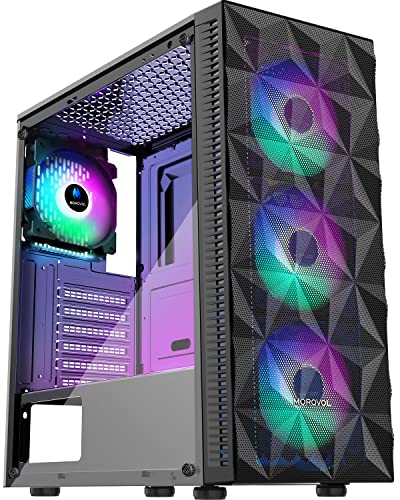 MOROVOL PC Case Pre-Install 4 RGB Fans
- 4PCS RGB Fans For Gifts - The 621…
- Tempered Glass Side Panel - The mid tower…
- Precise Design - Morovol 621-N4 computer tower case…
| Product | Key specs | |
|---|---|---|
| MUSETEX ATX PC Case 7 PWM ARGB | 【MUSETEX presents the K2 gaming pc case】both a… 【Tower Case Powerful Space Layout】The internal structure of… 【Upgrade High Speed IO Panel】1 x Type-C, 2… | Check price |
| Cooler Master Q300L V1 Micro-ATX PC Case | Ample Interior: Explore ample interior space for Micro-ATX… Components Clearance: Accommodates CPU coolers with a max… Versatile Cooling: Maximize cooling performance with a 240mm… | Check price |
| MOROVOL PC Case Pre-Install 4 RGB Fans | 4PCS RGB Fans For Gifts - The 621… Tempered Glass Side Panel - The mid tower… Precise Design - Morovol 621-N4 computer tower case… | Check price |
 MUSETEX ATX PC Case Pre-Install 6 PWM | After view MUSETEX item description,you will be pleasantly… 6 Highly Configurable PWM ARGB Fans Pre-installed- (1)… Expensive Glass Side Door - Not only is… | Check price |
As an Amazon Associate we earn from qualifying purchases at no extra cost to you.
Quick comparison: six cases worth shortlisting
Prices are general street ranges and move with sales and regional stock. Clearance figures come from each manufacturer’s spec sheet and are for the case in its stock fan configuration.
| Case | Best for | Board sizes | Max GPU | Max CPU cooler | Fans included | Typical price |
|---|---|---|---|---|---|---|
| Lian Li Lancool 216 | Best overall airflow | E-ATX / ATX / mATX | 392 mm | 180.5 mm | 2 × 160 mm front, 1 × 140 mm rear | $90–$100 |
| Fractal Design Pop Air | Best budget all-rounder | ATX / mATX | 405 mm | 170 mm | 3 × 120 mm (2 front, 1 rear) | $65–$85 |
| Corsair 4000D Airflow | Long GPUs, easy cable routing | ATX / mATX | 360 mm | 170 mm | 2 × 120 mm (1 front, 1 rear) | $75–$95 |
| Montech Air 903 Max | Most fans for the money | E-ATX / ATX / mATX | 400 mm | ≈170 mm | 4 × 140 mm (3 front ARGB, 1 rear) | $65–$85 |
| be quiet! Pure Base 500DX | Quiet builds | ATX / mATX | 369 mm | 190 mm | 3 × 140 mm | $90–$105 |
| Fractal Design Pop Mini Air | Small desks, mATX builds | mATX / mini-ITX | ≈355 mm | 170 mm | 3 × 120 mm (2 front, 1 rear) | $70–$90 |
Best overall: Lian Li Lancool 216
Who it suits: anyone building a standard ATX gaming PC who wants to buy one case and stop thinking about it. The 216’s trick is oversized front fans — two 160 mm units move more air at lower RPM than the 120 mm fans most $90 cases ship with, so the same airflow arrives with less noise. Add 392 mm of GPU clearance, a 180.5 mm cooler limit that swallows every mainstream dual-tower air cooler, and a mesh front that lifts off without tools.
Main trade-off: it is the widest case here at roughly 230 mm, and it sits right at the $100 line, so a sale is the difference between “under budget” and “over”. The glass side panel is also the full-height type, which means you lose a little cable-hiding depth compared with the 4000D.
Best budget pick: Fractal Design Pop Air
Who it suits: first-time builders and anyone who needs a complete, working machine for as little money as possible. Three 120 mm Aspect fans come pre-installed and pre-wired, so you can finish a build without buying a single extra fan. The 405 mm GPU figure is the longest clearance in this group — bigger than several $150 cases — and the swing-open front panel makes filter cleaning a ten-second job.
Main trade-off: the 170 mm cooler ceiling rules out the tallest flagship air coolers, and Fractal’s fan controller wiring is basic. Airflow is good rather than excellent; the mesh is finer than the Lancool 216’s, which is better for dust and slightly worse for volume.
Best for long graphics cards: Corsair 4000D Airflow
Who it suits: builders with a 330–360 mm card and a thick power cable to route. Corsair’s spec sheet lists 360 mm of GPU clearance, 170 mm of cooler height, and around 24 mm of space behind the motherboard tray — the most generous cable channel in this price bracket. The PSU shroud has a removable top section, which matters more than it sounds: it lets you plug in the 12V-2×6 connector before the card goes in.
Main trade-off: only two 120 mm fans included, so budget another $20–$30 for a front pair unless you already own spares. The front panel is also a fine mesh with a plastic frame that feels less substantial than the Lancool’s steel.
Best if you want fans included: Montech Air 903 Max
Who it suits: buyers who want the fan bill to be zero. Four 140 mm fans ship installed, three of them ARGB at the front, which is roughly $50–$70 of fans at retail. Clearances are generous — 400 mm GPU, E-ATX support — and the price usually lands under $80.
Main trade-off: brand support and documentation are thinner than Corsair’s or Fractal’s, and the bundled fans are the part most likely to develop bearing noise first. Treat them as consumables rather than a lifetime feature.
Best for quiet builds: be quiet! Pure Base 500DX
Who it suits: offices, bedrooms, and anyone recording audio near the PC. The 500DX pairs a mesh front with sound-dampening material on the side and top panels, ships three 140 mm Pure Wings 2 fans, and allows CPU coolers up to 190 mm — the tallest limit in this roundup, so even a large dual-tower fits with room to spare.
Main trade-off: 369 mm of GPU clearance is the shortest ATX figure here, and the dampening material costs you a few degrees under sustained load. It also drifts over $100 outside of sales.
Best for small desks: Fractal Design Pop Mini Air
Who it suits: micro-ATX and mini-ITX builds where footprint matters. It keeps the Pop Air’s three-fan layout and mesh front in a body around 20% shorter, with roughly 355 mm of GPU clearance — still enough for most current mid-range and upper-mid cards.
Main trade-off: you give up ATX board support, and long triple-slot cards leave almost no room between the card and the front fans, which complicates front radiator mounting.
How to choose: the four numbers that actually decide it
1. GPU length, plus what sits in front of it
Take your card’s length from the manufacturer’s spec sheet and add 25 mm for a fan wall or 52 mm for a front-mounted liquid cooler (27 mm radiator + 25 mm fan). A 336 mm card in front of a 360 mm AIO needs about 388 mm of rated clearance — which is why the Lancool 216’s 392 mm figure matters and a 360 mm case would not work. If you are mounting the radiator on top instead, add only the fan thickness.
2. Cooler height
Most dual-tower air coolers land between 155 mm and 165 mm tall, so a 170 mm case limit is fine — but only just. Check the number on the cooler’s own spec page, not the retailer listing, and remember that a side-panel fan or a thick glass panel can reduce the effective limit by a few millimetres.
3. Power supply length
Budget cases often cap the PSU at 160 mm with the hard drive cage installed and 180–200 mm with it removed. A 1000 W unit is frequently 160–180 mm long. Decide whether you are keeping the cage before you buy the power supply, or you will be removing a riveted bracket with a drill.
4. Fan count and size, priced honestly
A $75 case with four fans works out to about $18.75 per fan; an $85 case with two works out to $42.50 per fan once you buy two more. That math usually favours the fan-heavy case, provided the included fans are 140 mm or larger. Three 140 mm fans typically move as much air as four 120 mm fans at a lower noise level, because they spin slower to shift the same volume.
Decision matrix: match the case to your situation
| Your situation | What matters most | Pick |
|---|---|---|
| Absolute lowest total cost, no spare fans | Fans included, ≥330 mm GPU room | Montech Air 903 Max or Fractal Pop Air |
| Card is 340 mm or longer | Rated GPU clearance ≥380 mm | Fractal Pop Air or Lian Li Lancool 216 |
| 360 mm AIO on the front | Case depth and radiator offset | Lian Li Lancool 216 |
| PC lives in a bedroom or studio | Dampening, 140 mm fans, low RPM | be quiet! Pure Base 500DX |
| Desk is under 60 cm wide | Footprint, mATX board | Fractal Pop Mini Air |
| You rebuild or upgrade every year | Tool-less panels, shroud access | Corsair 4000D Airflow |
What wears out first, and what to clean
Cases rarely fail, but their parts do, in a predictable order. Fan bearings go first, especially sleeve-bearing fans mounted horizontally in the top position — rifle and fluid-dynamic bearings last longer there. Front-panel USB-A ports are second, because the spring contacts fatigue after a few thousand insertions. Next is the paint on the PSU shroud where cables rub, and last is the tempered glass panel, which does not wear but does shatter if you set the case down on a tile or stone floor.
- Front mesh filter: rinse every 4–8 weeks in a dusty home, monthly if you have pets.
- Top and PSU filters: every 2–3 months; a clogged PSU filter is the most common cause of a power supply overheating.
- Fan blades: wipe twice a year with a dry microfibre cloth. Do not use a vacuum directly on the blades — the static can damage the motor controller.
- Replacement fans: budget $12–$20 each for 140 mm PWM models; expect 3–5 years of daily use before noise becomes noticeable.
Two mistakes show up constantly. First, buying a case whose front accepts only 120 mm fans when 140 mm mounts cost the same. Second, ignoring the bend radius of a 12V-2×6 or 12VHPWR cable — those connectors need roughly 35–40 mm of clearance from the card’s edge to the side panel, and a case rated for a 360 mm card may not have it.
Frequently Asked Questions
Is a case under $100 good enough for a high-end graphics card?
Yes, provided the rated GPU clearance exceeds your card’s length by at least 25 mm. Several sub-$100 cases list 390–405 mm of clearance, which is more than many $150 cases offer. The limiting factor at this price is usually fan quality and cable channel depth, not GPU room.
How many case fans do I actually need?
Two intake and one exhaust is the practical minimum for a gaming build, and three 140 mm fans will outperform four 120 mm fans at the same noise level. More than four total fans gives diminishing returns unless you are running a very high-wattage GPU. Set the front fans as intake and the rear and top as exhaust.
Is mesh or a glass front better for airflow?
Mesh, without question. A solid glass front panel forces the front fans to pull air through narrow side gaps, which typically costs 5–10 °C on the GPU under sustained load. If you want a glass front for looks, plan on adding a bottom intake fan to compensate.
How do I measure whether my parts will fit before ordering?
Write down three numbers from manufacturer spec sheets: your GPU’s length, your CPU cooler’s height, and your PSU’s depth. Then add 25 mm to the GPU figure for a fan wall or 52 mm for a front radiator, and compare the total against the case’s rated clearance. If any figure is within 5 mm of the limit, choose a larger case.
Does a cheap case hurt cooling performance?
Only when the airflow path is blocked. A well-ventilated $70 case with mesh intake and three fans will beat a $150 case with a solid front panel. Spend the difference on fans and a cooler rather than on the chassis itself.
Can I add a USB-C front port to a case that does not have one?
Sometimes. Many budget cases leave the front-panel cutout in place, and a replacement I/O module with a USB-C 10 Gbps cable can be fitted if your motherboard has a spare front-panel Type-E header. Check the case’s parts list first — not every model sells the module separately.





